CI/CD workflow for Fabric & Power BI fully automated! (Series)
This end-to-end demo shows how to run Power BI as a fully automated CI/CD workload in Microsoft Fabric, using Azure DevOps, service principals, and deployment pipelines.

Introduction
It is not the first time I write about this topic. Back in April 2024, I published both an article and a video showing you how to Version-control & CI/CD your Power BI reports (Series), that solution worked but there was a major limitation: it required a user account excluded from MFA, because service principals were not supported at the time.
Since then, things have changed. Microsoft introduced a new Fabric service connection, which finally enables fully automated CI/CD using service principals. This removes the biggest blocker for real-world, production-grade implementations.
This series replaces and deprecates the previous one and at the same time, it answers two questions I keep getting—almost weekly—from the Fabric and Power BI community.
Setting the Stage
Let me first address one of the most frequently asked questions, best expressed by a member of the Fabric community:
Is Microsoft Fabric expected to replace or significantly change Power BI? [...] With all the recent announcements around Microsoft Fabric, I’ve been trying to better understand how it fits into the future of Power BI.
And the answer is that Power BI is now a core workload inside Fabric and it won't longer live in isolation; Fabric enhances Power BI’s ecosystem rather than replacing it, making analytics more scalable and collaborative across the organization and, if you work with Power BI today, you are already on the Fabric path—whether you like it or not 😅
This leads to the second most-asked question from the Power BI community:
Also, how should I or my company who currently works mainly with Power BI start preparing for Fabric?
From my experience working as a consultant with companies migrating reporting platforms (Qlik, Tableau, custom BI stacks) into Power BI and Fabric, we need to understand the following perspectives:
- #1 – Infrastructure. Before a single Power BI report is published, the Fabric platform itself must be provisioned, this includes supporting Azure infrastructure (e.g. Fabric capacities, Entra ID security groups, Key Vaults, etc.) and Fabric items created through APIs (e.g. workspaces, deployment pipelines, and other items).
- #2 – Development Cycle & Continuous Integration (CI). How Power BI practitioners develop reports in Fabric while aligning with version control. It covers how changes are structured, validated, and merged using branching strategies and pull requests, ensuring that report development naturally fits into a controlled CI process.
- #3 – Release and Continuous Delivery (CD). This perspective focuses on how Power BI changes are promoted across environments; it covers how content moves from development to production-like environments using Fabric deployment mechanisms and DevOps automation.
See it in action!
Series overview
In this article Choose the best Fabric CI/CD workflow option for you, MSFT presents developers with different options for building CI/CD processes in Fabric based on common customer scenarios, in this series, I'll implement Option 3 – Deploy using Fabric deployment pipelines, which I consistently recommend as the most pragmatic starting point for Power BI practitioners adopting Fabric.
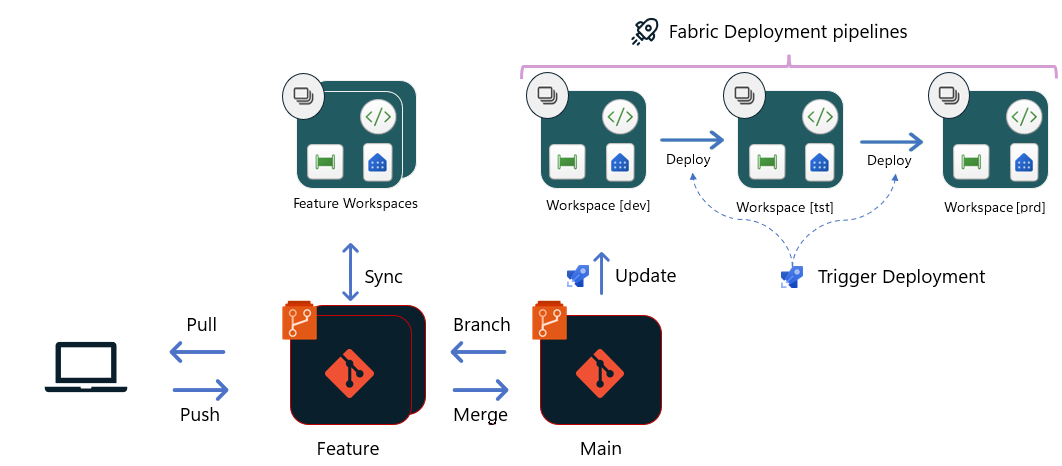
Covering each perspective in its own article and together, they will form a complete, end-to-end CI/CD workflow for Power BI in Microsoft Fabric.
#1 – Infrastructure as Code (IaC)
In this article, you will learn how Infrastructure as Code applies to Microsoft Fabric by clearly distinguishing between Azure-based PaaS infrastructure and Fabric-based SaaS resources. While both are foundational to a Fabric solution, they are created, managed, and automated in very different ways—and confusing the two often leads to incorrect assumptions and implementation pitfalls. The article walks through a neutral, practical example of provisioning the required Azure infrastructure using PowerShell (easily portable to Bicep or Terraform), and explains how Fabric items such as workspaces and deployment pipelines are created via the Fabric APIs. You will also see how FabricCatalyst approaches SaaS provisioning.
#2 – Development Cycle & Continuous Integration (CI)
This article focuses on how Power BI practitioners transition from file-based development to a version-controlled workflow in Fabric. It addresses common challenges for developers accustomed to working exclusively with Power BI Desktop and PBIX files, where changes are not easily diffed or tracked. You will learn what actually happens to a PBIX file once it is published to Fabric, how Git integration and Power BI Projects change the development experience, and how to properly create, review, and merge changes using pull requests. The article also clarifies the role of the new Power BI project format and the evolving TMSL-based model, cutting through the hype to explain what this means in practice.
#3 – Release and Continuous Deployment (CD)
This article covers how Power BI content is promoted across environments using Fabric deployment pipelines, and how this process can be automated despite current limitations in Fabric’s native DevOps integration. You will learn how Azure DevOps pipelines can be used to orchestrate deployments end to end, including environment promotions and release sequencing. The article also shows how DevOps environments and approvals can be introduced to add governance and control between stages, enabling a structured and auditable Continuous Delivery process for Power BI in Fabric.
Call to Action
This anchor article is not meant to convince you that CI/CD is a good idea for Power BI—you already know that at scale, it is unavoidable. Its purpose is to set the context for how Power BI should be operated inside Microsoft Fabric when governance, security, and automation actually matter.
The articles that follow are deliberately hands-on. They are based on real implementations, real constraints, and real trade-offs—not idealized diagrams. If you work with Power BI today and want to move beyond manual publishing, ad-hoc processes, and environment drift, I encourage you to follow the series end to end and adapt the patterns to your own setup.
If you disagree with any of the approaches, or if your organization is constrained by different realities, that is exactly the conversation I want to have. This series is meant to be applied and even challenged!
Start with the perspective that hurts the most in your current setup. By the end of the series, you should have a clear, working path to operating Power BI as a first-class, CI/CD-driven workload inside Fabric.