CI/CD workflow for Fabric – Release and Continuous Delivery (CD)
This final part shows how validated changes are promoted across environments using Fabric Deployment Pipelines and Azure DevOps orchestration. It covers environment-specific configuration, semantic model binding, and automated RLS as part of a fully governed release process.

This is Part 3 out of 3 of the series...
 Hector Sven
- ⏮️ Previous Development Cycle & Continuous Integration (CI)
Introduction
If Continuous Integration ensures that approved changes are automatically reflected in a version-controlled workspace, Continuous Delivery tackles on how those validated changes move safely across environments:
"[...] the core idea is to promote validated, version-controlled content from one environment to the next, ensuring consistency and reducing manual errors." Ref. Why my deployment pipeline override Lakehouse shortcuts?
In Microsoft Fabric, this is where Fabric Deployment Pipelines 1️⃣ enters the picture:
Microsoft Fabric's deployment pipelines tool provides content creators with a production environment [...] to manage the lifecycle of organizational content. Ref. Introduction to deployment pipelines
This process is enhanced by introducing Azure DevOps pipelines 2️⃣ as a complementary orchestration layer, whereas not mandatory, DevOps pipelines add structured automation, approval workflows, and governance controls on top of Fabric’s native capabilities.
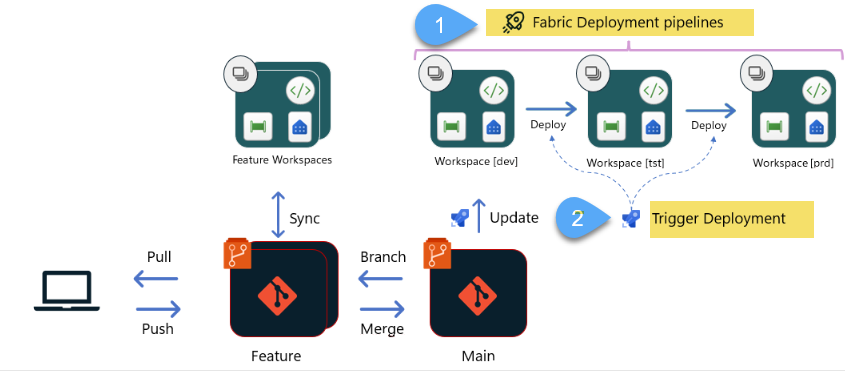
Ref. Choose the best Fabric CI/CD workflow option for you
Together, they form a structured and automated release process in Fabric, once again, I'm focusing on Power BI reports, but this applies to all other items (e.g. Lakehouse, Notebooks, etc.)
Fabric Deployment vs Azure DevOps pipelines
It is important to clearly distinguish between these two concepts.
- Fabric Deployment Pipelines understand Fabric artifacts. This is a powerful, out-of-the-box capability! They manage stages (e.g. Dev, Test, and Production) and provide the ability to promote items between workspaces, they also support selective deployment.
- Azure DevOps (YAML pipelines) act as the orchestration layer. They determine when promotions happen, under what conditions, and with which approvals, that said, the use of Azure DevOps as an orchestration layer is optional; Fabric Deployment Pipelines can be executed manually through the Fabric interface or programmatically via the Fabric APIs
Azure DevOps pipelines
Azure DevOps Pipelines provides a structured CI/CD platform that separates delivery logic from deployment targets; pipelines define the execution flow whilst environments introduce governance and promotion controls.
DevOps YAML Pipeline
In this article I explain in detail how to create a YAML pipeline
 Hector Sven
Environments
We are going to use DevOps environments to configure approval gates to add a formal authorization step before promoting to non-development environments (e.g. uat, prod), in addition, environments also provide the following benefits:
- Deployment history. Pipeline name and run details are recorded.
- Traceability of commits & work items. View jobs, commits and work items deployed.
- Security. Specifying which users & pipelines are allowed to target an environment.
Environment-Specific Configuration
Once a feature branch (e.g. feature/ws_workspace-main-branch/new-or change-report) is merged into the workspace’s upper-most integration branch, an Azure DevOps YAML pipeline is automatically triggered. This pipeline performs two sequential operations:
- Invokes the
UpdateFromGitoperation to synchronize the approved changes into the integration workspace - Calls the Fabric Deployment Pipeline to promote the Dev-to-Test stage—and, if governance rules such as approvals and permissions allow it, potentially onward to Production.
At this point, content promotion begins, but content alone is not enough, in real-world implementations, each environment connects to different data sources, dev to databases with dummy data whereas prod with real data.
There are currently two complementary approaches to managing these differences in Fabric: Deployment Rules and most recently Variable Libraries.
Deployment Rules
Fabric Deployment Pipelines support deployment rules that allow you to override specific settings during promotion, for example, switch the data source connection of a semantic model when moving from Dev to Test, once the rule is defined, content deployed inherits the value as defined in the deployment rule.
Variable Libraries
[...] bucket of variables that other items in the workspace can consume as part of application lifecycle management. It functions as an item within the workspace that contains a list of variables, along with their respective values for each stage of the release pipeline Ref. What is a variable library?
Post-Deployment Configuration
In some scenarios, additional post-deployment configuration is required, in the solution, I'm including two: connection binding of semantic models and row-level security (RLS) configuration
Connection binding of semantic models
Microsoft recently introduced the Bind Semantic Model Connection REST API, which allows connection bindings to be updated programmatically. This capability is essential when promoting content across environments, where development, test, and production may rely on different data connections. By invoking this API as part of the release pipeline, connection bindings can be adjusted automatically, eliminating manual reconfiguration and ensuring that each environment points to the correct underlying data sources.
Row-level security (RLS) configuration
In one customer implementation, this requirement was addressed by executing a notebook as part of the post-deployment process; the notebook interacts programmatically with the semantic model using the semantic-link-labs (sempy) library, leveraging the TOM interface to apply role assignments automatically.
Solution
In the following video, I walk through the complete flow: from a merged feature branch, to automated UpdateFromGit, to Dev → Test promotion, environment-specific overrides, semantic model binding, and RLS configuration — all executed through Azure DevOps orchestration.