CI/CD workflow for Fabric – Development Cycle & Continuous Integration (CI)
This article shows how Continuous Integration works for Power BI in Microsoft Fabric. By using Git as the single source of truth and automating Update-from-Git operations, approved changes are continuously integrated into a controlled workspace, ready for promotion.

This is Part 2 out of 3 of the series...
 Hector Sven
- ⏮️Previous Infrastructure as Code (IaC)
- ⏭️Next Release and Continuous Deployment (CD)
Introduction
For many Power BI practitioners, the Development Cycle and Continuous Integration (CI) will feel like the most unfamiliar part of adopting Microsoft Fabric. Historically, Power BI development has revolved around local work in Power BI Desktop, saving reports as PBIX files without version control, and collaborating informally through file sharing (for example, SharePoint) or workspace permissions.
Fabric changes this dynamic by introducing Git as a first-class concept. With that shift, Power BI development stops being file-centric and becomes source-controlled software development.
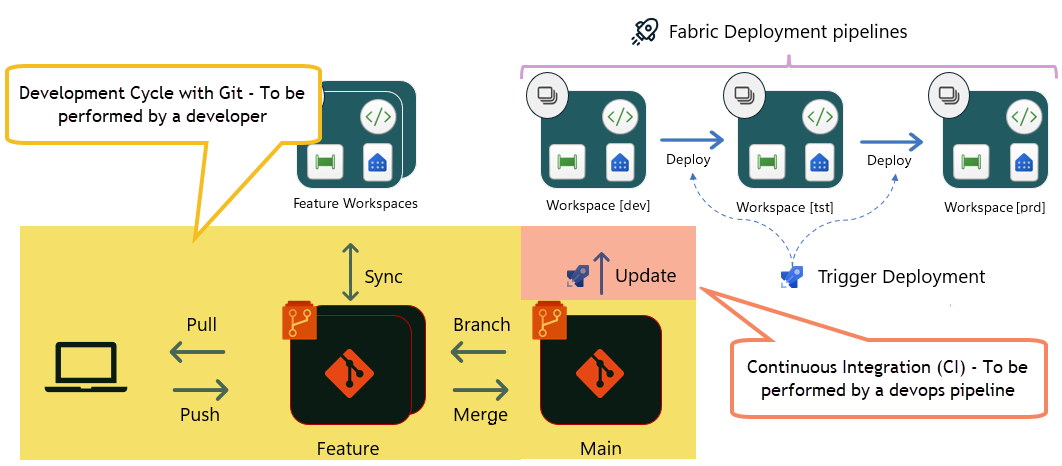
Before going deeper into CI concepts, it is important to understand where this article fits in the broader CI/CD workflow for Fabric and Power BI; the section highlighted represents the Development Cycle and Continuous Integration phase, which is the focus of this article in the series.
Option 3 - Deploy using Fabric deployment pipelines
Ref. Choose the best Fabric CI/CD workflow option for you
Think of this as the point where individual Power BI reports are authored, validated, and prepared for delivery into the Fabric service.
Development Cycle
Before going any further, if you are unfamiliar with Git version control, I suggest you read "A Minimal Git Primer".
A Minimal Git Primer
This is not a deep dive into Git or branching strategies, but a lightweight explanation to ensure the rest of the article makes sense—especially if you have never worked with version control before.
At a high level, Git is simply a way to track changes over time. Instead of saving multiple versions of the same PBIX file, Fabric materializes Power BI reports as source-controlled, text-based assets once they are published into a Git-enabled workspace. This allows changes to be tracked incrementally, with a clear history of what changed, when, and by whom.
Developers do not all work directly on the same version of the code. Each developer makes changes in an isolated branch (aka feature branch), which you can think of as a temporary copy of the project where development can happen without affecting others. When the work is ready, those changes are reviewed and merged back into the main branch.
Get more info at 1.1 Getting Started - About Version Control
In this workflow, one workspace acts as the integration point for development. It is the workspace connected to the main branch and serves as the starting stage of the Fabric Deployment Pipeline. Changes only reach this workspace once they have been merged from a feature branch, making it the controlled entry point for everything that will eventually be promoted to production-like environments. The push and pull operations shown in the diagram represent the synchronization between Git and Fabric.
The goal of CI in Fabric is not to turn Power BI practitioners into DevOps engineers but to introduce a development lifecycle that shifts the source of truth away from individual files into a version control system (Git); the following video shows how this works in practice and explores the different ways Power BI reports can be authored and synchronized with Fabric using Git.
In summary...
- Delivering reports - Publishing vs. Git‑Based Power BI Projects
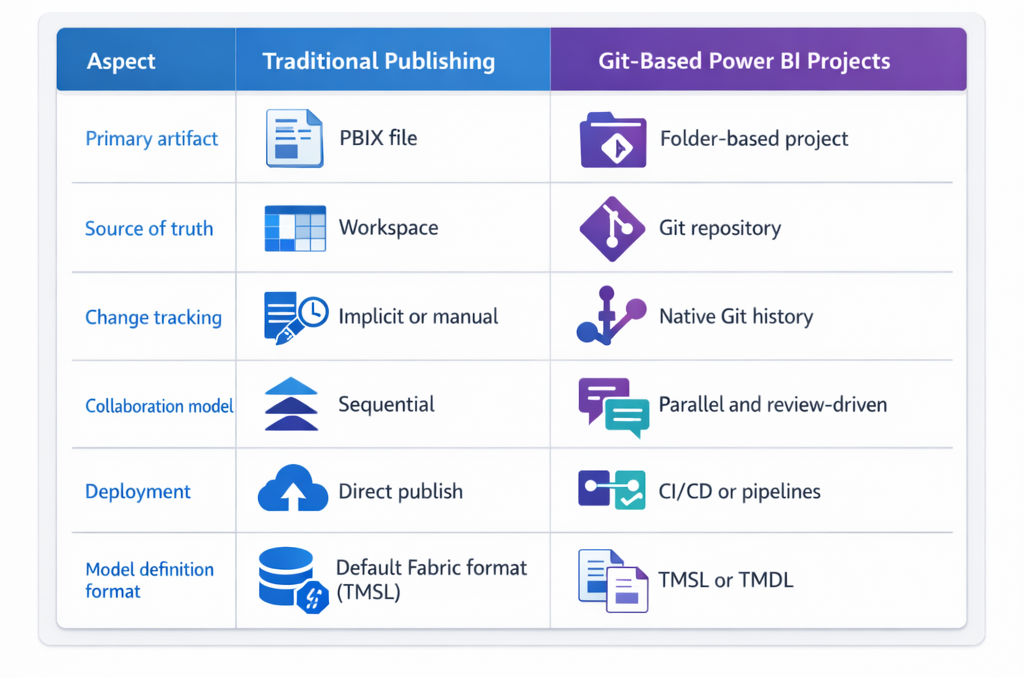
- Model definition format - TMSL vs. TMDL
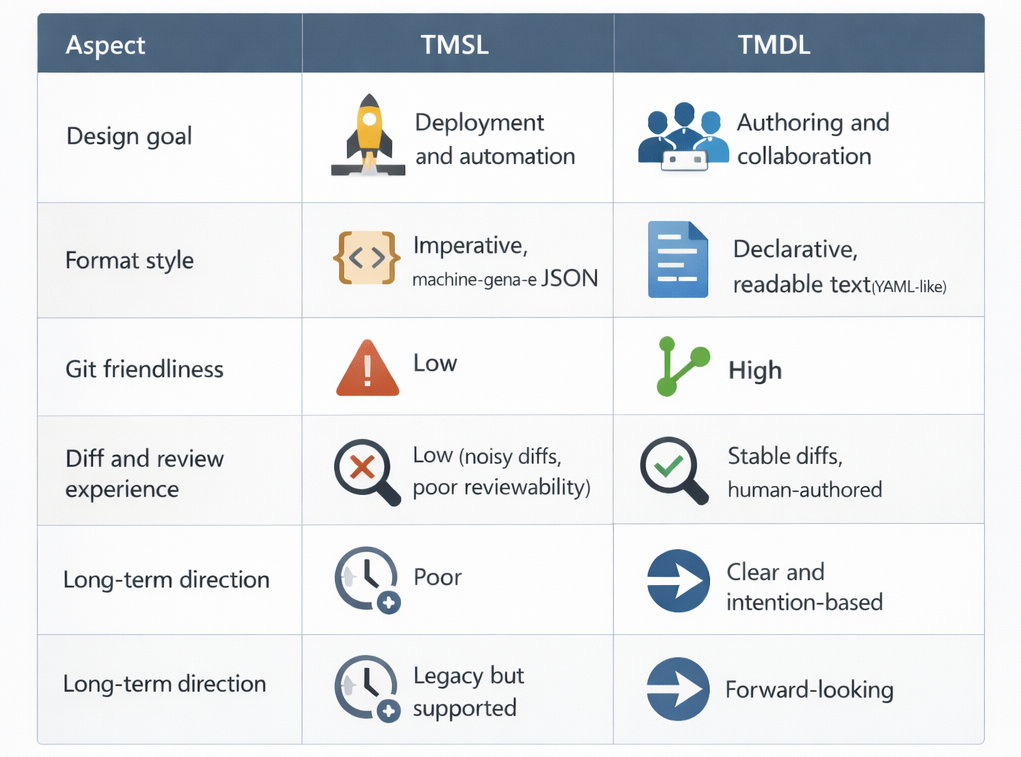
Continuous Integration
Once a pull request is approved and merged, the developer’s work is not immediately reflected in the Fabric workspace. This is a crucial detail that is often overlooked when people first adopt Git integration in Fabric.
In Fabric, Git is the source of truth, but the workspace does not automatically reflect changes that land in its "main" branch. Until someone explicitly triggers an Update from Git, the workspace remains unchanged. In practice, this means workspace's main branch acts as a waiting room for approved changes, while the workspace represents the currently active state of the solution; this behavior is intentional, it provides a clear separation between what has been approved in version control and what is actively running in the Fabric environment.
However, it also introduces an important question: who is allowed to update the workspace from Git, and when?
In environments with strict governance requirements, allowing users to manually trigger updates from Git is often unacceptable to ensure that everything that reaches the workspace has gone through version control, reviewed and approved!
To achieve this, the Update from Git operation was delegated to an Azure DevOps pipeline. The pipeline is automatically triggered whenever changes are merged into the workspace’s main branch and relevant paths (for example, /fabric). Once triggered, the pipeline authenticates using a service principal and performs the synchronization on behalf of the team.
This is what CI looks like when applied pragmatically to Power BI and Fabric: Git as the single source of truth, automation as the integration mechanism, and workspaces as controlled integration points rather than mutable authoring surfaces.
Conclusion
Continuous Integration in Fabric is not about adding complexity to Power BI development—it is about removing uncertainty. By shifting the source of truth from individual PBIX files and mutable workspaces into Git, teams gain traceability, consistency, and confidence in what they are delivering.
In this article, you’ve seen how Git-enabled workspaces, feature branches, pull requests, and automated Update from Git operations work together to form a true CI process. Developers remain focused on authoring reports, while automation ensures that approved changes are continuously and reliably integrated into a controlled workspace, ready for promotion through deployment pipelines.
This foundation is what enables safe, predictable releases—something we will build on next when we move into Release and Continuous Delivery (CD).