CI/CD workflow for Fabric – Infrastructure as Code (IaC)
This article explains the two infrastructure scopes—Azure PaaS and Fabric SaaS—why they differ, and how to provision them safely using Infrastructure as Code.

This is Part 1 out of 3 of the series...
 Hector Sven
- ⏭️Next Development Cycle & Continuous Integration (CI)
Introduction
The challenge is that Fabric infrastructure does not live in a single place or under a single control plane. To work effectively with Fabric, you must understand that its foundation spans two distinct infrastructure scopes:
- Azure-based PaaS infrastructure. Cloud-native platform that delivers managed services for compute, storage, networking, and security
- Fabric-based SaaS infrastructure. Provides the foundation for collaboration and lifecycle management of items (e.g., semantic models and Power BI reports) through workspaces, deployment pipelines, domains/subdomains, and connections.
Both are required and serve the same platform, but they are created, automated, and governed very differently; understanding this distinction is essential to avoid incorrect assumptions and use the right tools.
Azure PaaS: Supporting Infrastructure
The first layer lives entirely in Azure and provides the foundation on which Fabric operates being the Fabric capacity is the most critical element here because Microsoft Fabric is a SaaS layer that runs on Azure!
The Fabric capacity you provision in Azure is what actually supplies the compute, memory, concurrency, and workload governance that every Fabric experience depends on; we also need to consider among other things Key Vaults and other identity and security-related resources like Entra ID security groups & Service principals
When working with Azure PaaS resources, you typically have several options:
- Manual configuration (ClickOps) – generally not recommended beyond experimentation
- Declarative IaC frameworks such as Bicep or Terraform
- Imperative scripting using PowerShell
I’ll use one PowerShell script to set up all the Azure PaaS infrastructure and show the full end-to-end process in a simple, easy-to-follow way without getting into the Bicep vs. Terraform debate.
Fabric SaaS: Infrastructure via APIs
The second infrastructure layer lives entirely inside Fabric (SaaS platform), which means:
Whether you use, Terraform provider for Fabric, new Fabric command line interface (CLI), or a custom solution like FabricCatalyst:
Once this is understood, the tooling debate becomes much clearer.
Terraform, Fabric CLI, and API-First Approaches
When using Terraform or Fabric CLI it is important to understand that you are effectively dependent on two release cycles:
- The Fabric REST APIs themselves
- Terraform/Fabric CLI community-driven implementation
As Fabric evolves, new API capabilities may become available before they are surfaced in Terraform/Fabric CLI modules, meaning that you either wait for the updates (be a passive consumer for free) or contribute those changes yourself (invest your work for the community).
In my case, I chose to interact directly with the Fabric APIs through a thin PowerShell-based abstraction, this approach allows me to:
- React quickly to changes in the Fabric platform
- Experiment with new capabilities as they are released
- Configure Fabric resources exactly as required for CI/CD scenarios
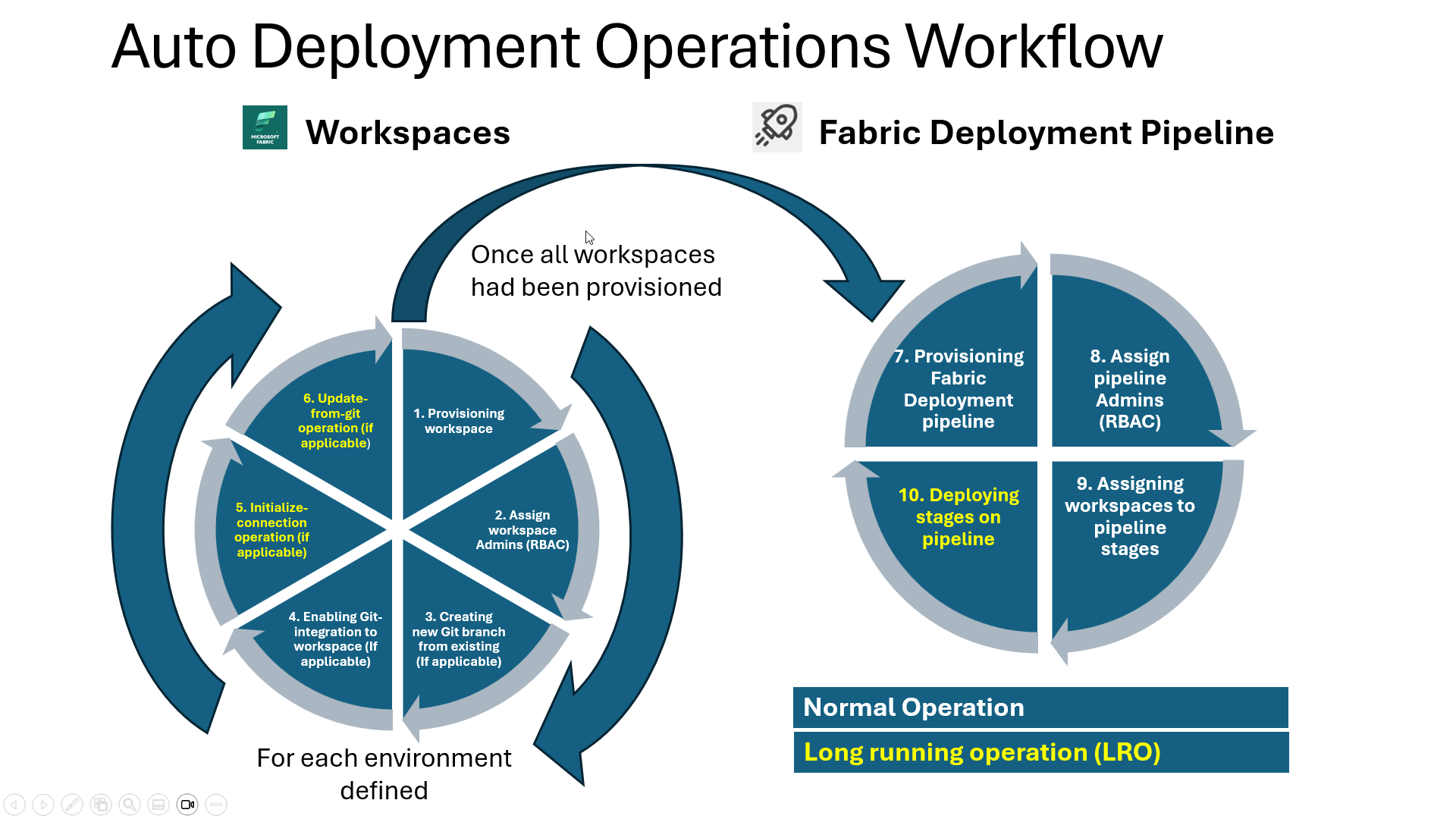
In the following diagram, is the operations perform in the code!
The Key Takeaway
There is no single “correct” tool for provisioning Microsoft Fabric infrastructure.
What matters is understanding:
- Where each infrastructure layer lives
- Which control plane it belongs to
- What dependencies each abstraction introduces
- How quickly you need to adapt to platform changes
With the infrastructure foundation in place, we can now move on to the next challenge: how Power BI practitioners actually develop and version-control their work inside Fabric.